



Modern LG dryers come equipped with a smart safety feature called Flow Sense, designed to detect airflow restrictions inside the dryer vent system. When LG dryer vent codes like d80, d90, or d95 appear, they indicate that the vent may be partially or severely blocked. While these alerts may seem minor at first, they are actually early signs of a problem that can reduce drying performance, increase energy consumption, and even create a serious fire hazard if ignored.
Understanding what these LG dryer vent flow warning codes mean is essential for keeping your appliance running safely and efficiently. In this guide, we’ll explain the common causes behind these warnings, the risks associated with restricted airflow, and the most effective solutions to clear the blockage and restore proper dryer performance. If you are experiencing repeated airflow issues or need professional dryer vent cleaning services in Poway, expert local technicians can help inspect, clean, and restore your dryer vent system for safer and more efficient operation.
What Are LG Dryer Vent Flow Warning Codes?
LG dryers use a feature called Flow Sense to detect airflow problems in the dryer vent. When the vent gets blocked, the dryer shows warning codes like d80, d90, and d95.
d80 Code
The d80 warning means the dryer vent is about 80% blocked. Airflow is restricted, so clothes may take longer to dry.
d90 Code
The d90 code means the vent is around 90% blocked. The dryer may overheat and use more energy because hot air cannot escape properly.
d95 Code
The d95 warning means the vent is almost completely blocked. This is a serious issue that can become a fire hazard if not fixed quickly.
Common Causes of LG Dryer Vent Flow Warning Codes
Lint Buildup
Lint collects inside the vent over time, blocking airflow and reducing dryer performance.
Crushed Vent Hose
A bent or crushed vent hose restricts airflow and prevents hot air from escaping properly.
Long Duct Runs
Long vent ducts with multiple bends make it harder for air to move through the system efficiently.
Bird Nests or Debris
Bird nests, dust, and debris inside the vent can block airflow and trigger warning codes.
Improper Installation
Poor vent installation can limit airflow and cause the dryer to display Flow Sense errors.
Dirty Exterior Vent Cap
A dirty or blocked exterior vent cap stops hot air from leaving the dryer vent system properly.
Seeing LG dryer vent codes repeatedly? Contact Oceanside Air Duct Cleaning in Poway for professional dryer vent cleaning and safer dryer performance.
Risks of Ignoring LG Dryer Vent Flow Warning Codes
Fire Hazard
Blocked dryer vents can trap heat and lint inside the system. This greatly increases the risk of a dryer fire.
Longer Drying Times
Restricted airflow makes it harder for clothes to dry properly. As a result, drying cycles become longer than normal.
Higher Electricity Bills
When the dryer runs longer, it uses more electricity. This can increase your monthly energy costs over time.
Moisture and Mold Problems
Poor ventilation can cause moisture to build up indoors. This may lead to mold growth and unpleasant odors.
Dryer Overheating
Limited airflow forces the dryer to work harder and become too hot. Overheating can damage internal components and reduce appliance life.
Step-by-Step Solutions for LG Dryer Vent Flow Warning Codes
1. Clean the Lint Filter
The lint filter plays an important role in maintaining proper airflow inside the dryer. When lint builds up on the filter, the dryer has to work harder, which can trigger LG dryer vent codes and reduce overall drying efficiency.
- Remove the lint filter from the dryer
- Clear away all collected lint by hand
- Wash the filter with warm water if needed
- Let the filter dry completely before reinstalling
Cleaning the lint filter regularly improves drying performance and helps prevent overheating problems. It is recommended to clean the filter after every drying cycle for the best results.
2. Inspect the Vent Hose
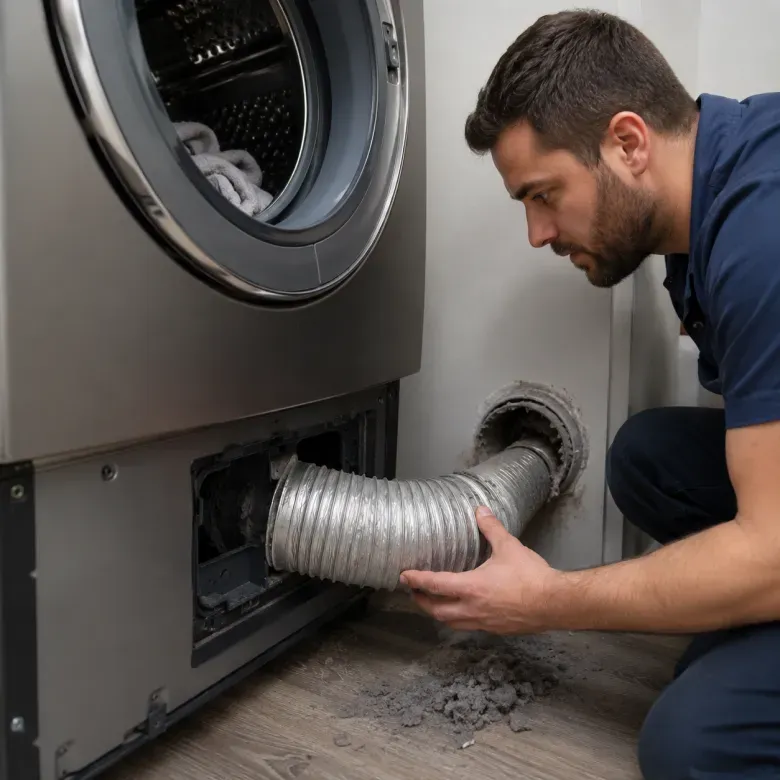
The dryer vent hose carries hot air from the dryer to the outside of your home. If the hose becomes bent, crushed, or damaged, airflow can become restricted and trigger warning codes.
- Check the hose for bends or sharp turns
- Look for cracks, holes, or loose connections
- Straighten any crushed sections carefully
- Replace damaged hoses if necessary
A properly installed vent hose allows air to flow freely and helps the dryer run more efficiently. Regular inspection can also reduce drying time and improve overall safety for homeowners in Poway.
3. Vacuum the Ductwork
Lint and dust can build up deep inside the dryer duct over time. This buildup blocks airflow and may cause LG dryer vent flow warning codes to appear.
- Disconnect the dryer from the power source
- Remove the vent hose carefully
- Use a vacuum to clean inside the duct
- Remove lint and debris from hard-to-reach areas
Cleaning the ductwork improves airflow and helps the dryer work more efficiently. Regular duct cleaning also helps prevent overheating, fire hazards, and common LG Dryer Vent Codes caused by blocked airflow.
4. Check the Outside Vent Flap
The outside vent flap allows hot air to escape from the dryer system. If the flap is blocked or stuck, airflow becomes restricted and warning codes may appear.
- Inspect the vent flap for lint buildup
- Remove dirt, debris, or bird nests
- Make sure the flap opens and closes freely
- Clean the surrounding vent area properly
Keeping the outside vent flap clean helps maintain smooth airflow and improves dryer performance. It also prevents moisture buildup and reduces overheating problems.
5. Reduce Vent Length and Bends
Long vent systems with multiple bends can slow down airflow inside the dryer duct. Restricted airflow forces the dryer to work harder and may trigger Flow Sense warning codes.
- Keep the vent duct as short as possible
- Reduce unnecessary turns or sharp bends
- Use rigid metal ducts for better airflow
- Avoid twisting or crushing the vent hose
A shorter and straighter vent system improves airflow and drying efficiency. It also helps reduce overheating and lowers the chances of future vent blockage issues.
6. Run the Flow Sense Test Again
After cleaning and inspecting the vent system, run the Flow Sense test again to check whether the airflow problem has been fixed. This helps confirm that the warning code is cleared properly.
- Reconnect the vent hose securely
- Turn the dryer back on
- Start the Flow Sense or test cycle
- Check if the warning code disappears
If the code still appears after cleaning the vent system, there may be a deeper blockage or installation issue. In that case, professional inspection may be required.
Also Read: The Hidden Benefits of Professional Dryer Duct Cleaning for Homeowners
When to Call a Professional?
Persistent d90/d95
If the d90 or d95 warning codes continue appearing even after cleaning the vent system, there may be a serious blockage or airflow issue. Persistent LG dryer vent codes can increase the risk of overheating and poor dryer performance. In such cases, it is best to contact a professional for a complete vent inspection.
Hidden Duct Systems
Some dryer vent systems run through walls, ceilings, or hard-to-reach areas that are difficult to inspect and clean properly. Hidden ducts can collect lint over time and create serious airflow restrictions. A professional can safely clean and inspect these hidden vent systems more effectively.
Burning Smell
A burning smell coming from the dryer is a serious warning sign that should never be ignored. It may happen due to overheating, lint buildup, or blocked airflow inside the vent system. If you notice this smell, stop using the dryer immediately and schedule a professional inspection with Oceanside Air Duct Cleaning, serving homeowners in Poway.
Overheating Dryer
If the dryer becomes extremely hot during or after a cycle, it may indicate restricted airflow inside the vent system. Overheating can damage internal components and increase the risk of fire hazards. A professional inspection can help identify and fix the underlying problem safely.
Smart Dryer Vent Prevention Tips
Monthly Lint Cleaning
Cleaning the lint filter and vent system every month helps maintain proper airflow inside the dryer. Regular lint removal improves drying performance, reduces energy usage, and lowers the risk of overheating or fire hazards.
Annual Deep Vent Cleaning
A deep dryer vent cleaning at least once a year helps remove hidden lint and debris from the duct system. Regular deep cleaning improves airflow, increases dryer efficiency, and helps prevent serious vent blockage problems.
Use Rigid Metal Ducts
Rigid metal ducts provide better airflow and are safer than flexible plastic or foil vents. They reduce lint buildup inside the vent system and help improve overall dryer performance and safety.
Avoid Overloading the Dryer
Overloading the dryer can restrict airflow and make the appliance work harder than normal. Drying smaller loads helps clothes dry faster, improves efficiency, and reduces strain on the vent system.
Conclusion
Ignoring LG dryer vent codes like d80, d90, and d95 can lead to poor drying performance, higher energy bills, overheating, and even serious fire hazards. These warning codes are designed to alert users about airflow restrictions before the problem becomes dangerous. Understanding the causes and fixing vent issues early can help keep your dryer running safely and efficiently.
Regular maintenance such as cleaning the lint filter, inspecting the vent hose, and deep cleaning the duct system can prevent most airflow problems. If warning codes continue appearing even after cleaning, homeowners in Poway should contact a professional technician for a complete inspection. Taking proper care of your dryer vent system not only improves performance but also extends the life of your appliance.